

GPA Calculator is a free online tool to calculate GPA of your subjects. Use this calculator to see your overall grade and GPA simply with a single click within a fraction of a second.
The Nepal Government and the National Examination Board (NEB) have been working toward publishing SEE results faster than in previous years. For SEE 2081, the exams were held from Chaitra 6 to Chaitra 19, 2081 (March 20 to April 1, 2025), and the result was officially published on 13 Ashadh 2082 (June 27, 2025) — roughly within three months of the exam. This year, for SEE 2082, NEB aims to publish results even faster, with plans to significantly reduce the gap between exam completion and result publication.
| GPA Range | Grade | Description |
|---|---|---|
| 3.6 – 4.0 | A+ | Outstanding |
| 3.2 – <3.6 | A | Excellent |
| 2.8 – <3.2 | B+ | Very Good |
| 2.4 – <2.8 | B | Good |
| 2.0 – <2.4 | C+ | Satisfactory |
| 1.6 – <2.0 | C | Acceptable |
| 1.2 – <1.6 | D | Basic |
| <1.2 | NG | Not Graded (Fail) |
After your SEE result is published, you can enroll in Grade 11 (Plus Two) across streams such as Science, Management, Humanities, Education, or Law based on your GPA. You may also explore CTEVT technical programs, A-Level courses, or skill-based training programs in fields like digital marketing, graphic design, and IT.
The online result displayed on see.ntc.net.np or VIA SMS is for information purposes only. For official college admission processes, you will need the original printed marksheet issued by your school, which NEB distributes through schools after the result is published.
According to our guidance :Your symbol number is printed on your SEE admit card. If you have lost your admit card, contact your school’s examination department — they maintain records of all students’ symbol numbers. As a last resort, you can contact the Office of the Controller of Examinations at NEB, Sanothimi, Bhaktapur.
If you notice any discrepancy such as a wrong name, symbol number, or incorrect subject grade. Relax and contact your school administration. They will guide you through the official correction process with NEB. If the issue is not resolved at school level, contact NEB’s Office of the Controller of Examinations directly at Sanothimi, Bhaktapur, or email info@neb.gov.np. Always act quickly as correction windows are time-limited after result publication.
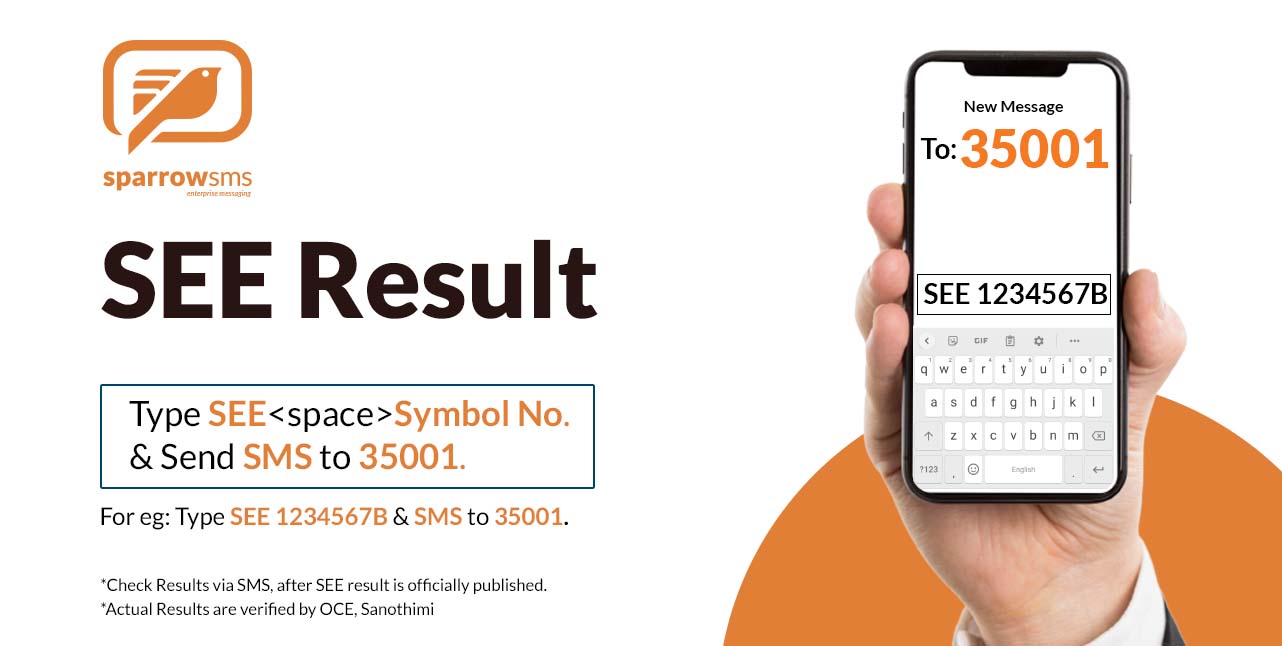
Yes. From our own service you do not need an internet connection to check your SEE result.There are multiple authorized SMS shortcodes to check your SEE result. For a fast and reliable SMS result service trusted by students across Nepal for over 12 years, you can use Sparrow SMS by sending your symbol number to 35001.
Using 35001 to check your SEE Result is one of the most convenient and Simple way. Also 35001 is the first SMS code to be introduced by Sparrow SMS to check SEE Result via SMS in Nepal. So, it is the pioneer and the most trusted way to check your SEE Results. Also, from our past experiences we have compiled videos on How to check SEE result via SMS 35001. If there is any confusion then view the video to get clarity.
With that Sparrow SMS Wishes you all Best of Luck for SEE Result 2082/2083.
Get your SEE result related questions answered here in the FAQs.
To check your SEE result 2082 via SMS, simply follow the following steps:
1. Go to your mobile messages box (SMS)
2. Compose a new message
3. Type SEE your symbol no.
4. Send SMS to 35001.
For Eg: Type SEE 01234567A and send it to 35001.
To check your SEE result 2082 via SMS, simply follow the following steps:
1. Go to your mobile messages box (SMS)
2. Compose a new message
3. Type SEE your symbol no.
4. Send SMS to 35001.
For Eg: Type SEE 01234567A and send it to 35001.
You will be receiving the SEE Result 2082 with GPA grade after the result is officially announced by OCE. Below is a sample of your SEE Result.
“Congratulations your symbol number is 0000000A. You have passed.
GPA: XXX”
Sparrow SMS delivers the SEE result 2082 only after the results are officially announced by OCE. Once your results are announced officially, you will be able to view the SEE exam result by sending SMS. Type SEE Symbol-number and send it to 35001 only after the results are out by OCE.
Yes, we distribute the SEE results via SMS after the results are announced by OCE. So, you can type SEE Symbol-number and send it to 35001 to get the results of anyone who appeared for SEE exam 2082 but only after the results are published by OCE.
Each SMS would cost you Rs 5 + additional taxes only.
Sparrow SMS being the regular provider of SEE Result Nepal, has always believed in delivering quality services that are easy to use and completely trouble-free. We have been circulating SEE Results to your cell phones after the results are published by OCE at the soonest (generally, in less than 5 seconds). So, in order to come up with such a quick service, we have allocated defined resources for it and also paid other stakeholders on the line. We all know everything has a cost to pay for!
Besides that, we do not get Rs 5 as a sum for us. Each Rs. 5 is divided as below.
50% – Is taken by Telecom Operators ( Like Nepal Telecom and Ncell )
6% – Is RTDF ( Rural Telecom Development Tax)
1.5% – Is TDS
Also, we need to pay good amount per SMS to OCE as well after all data verification.
Further, we have Rs 1 Advertisement Cost for promoting SEE result Nepal format over various platforms. And the major costs at our end is yet unseen.
I. High Configuration Servers, that has to be maintained for long run in Expensive Data Centers.
II. Telecom Connection
III. Highly Skilled Telecom/VAS Engineers
IV. Content and Digital Marketers and other employees cost.
Only after distribution of all these costs, we receive the remaining amount to our side. We have always been working hard to provide you a reliable medium for checking SEE Result 2082 at a very low cost.
Previously, many students had to go through many hassles to view their SLC Results Nepal like phone calls, buying expensive newspapers available in limited numbers, visit cyber cafes, high loaded traffics on websites and what not? But, Sparrow SMS has put on all its effort and knowledge to overcome such hassles with a genuine SMS service to distribute SEE Result Nepal via SMS after the results are published by OCE at a reliable price of Rs 5 + additional taxes only.
And there are absolutely no hidden charges for SMS. Each SMS for viewing SEE Result 2081/2082 would cost you Rs 5 + additional taxes only.
As a well-established and reputable provider, we specialize in delivering a wide range of SMS marketing services. Our offerings include Bulk SMS, Web SMS, OTP SMS Gateway, and SMS API solutions tailored for businesses of all sizes.
Experience reliable and efficient communication with our top-notch SMS services.

© 2023 Sparrow SMS. All Rights Reserved.